Design a 3D print with ChatGPT or Claude
AI chat assistants are good at turning "a wall hook for a 20 mm broom handle" into numbers, but they can't hand you a 3D file. FlatCad 3D closes the gap: it gives the AI a short description of its recipe format, the AI writes the part as a list of features, and you paste that back and get a real, editable 3D model you can print.
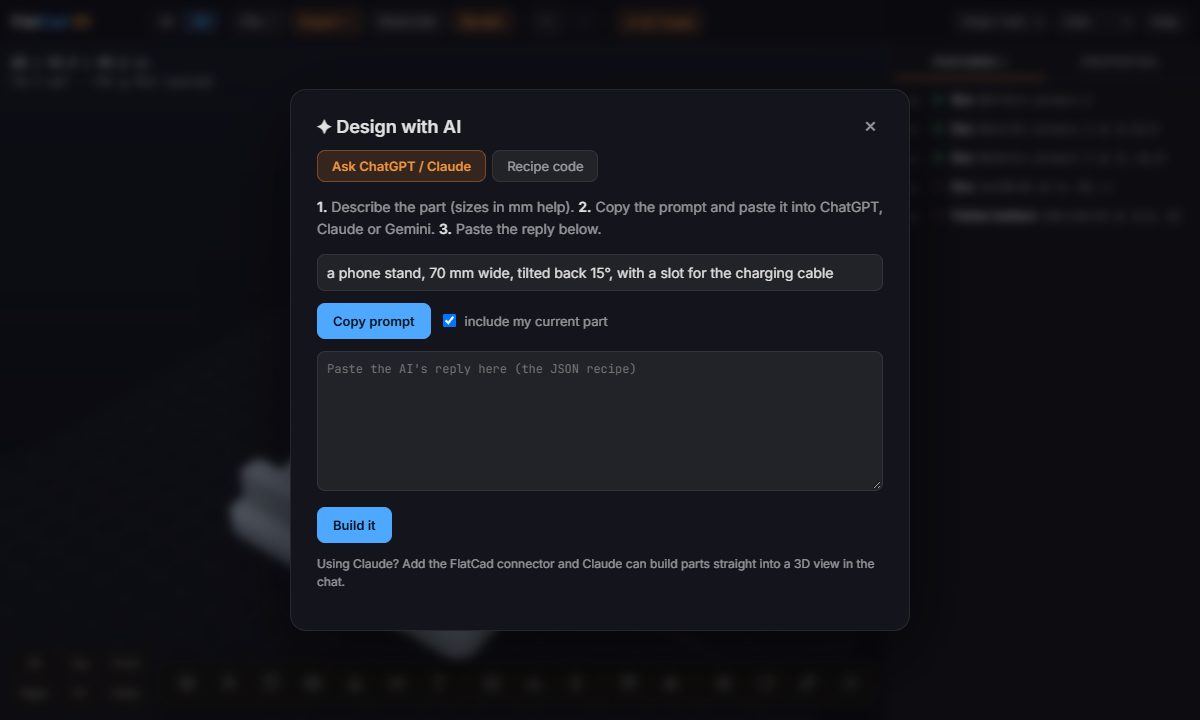
How it works
Open the AI dialog. In FlatCad 3D, click ✦ AI / Code at the top.
Describe the part. Sizes in millimetres help: "a 60 × 40 mm plate, 4 mm thick, rounded corners, four M3 countersunk holes 4 mm from the edges".
Copy the prompt. Copy prompt puts your request plus the recipe format on the clipboard. Tick include my current part to ask for a change to what you already have.
Paste it into ChatGPT, Claude or Gemini. The reply is a JSON recipe: a name and a list of features.
Paste the reply back and press Build it. Code fences and chatter around the JSON are ignored. Any feature with a problem is marked with a ! in the list.
Adjust and export. Every feature is editable in the Properties tab, then Export → STL or 3MF.
Why a recipe and not a mesh
When an AI writes a mesh or OpenSCAD code, a small mistake means asking again and hoping. A FlatCad recipe is a short list of named features, a box, a hole, a pattern, so you can see exactly what the AI meant and fix one number yourself. The Recipe code tab shows the whole part as JSON, for anyone who'd rather edit it by hand.
Prompts that work
- "A cable clip for a 6 mm cable that screws to a desk with one M4 screw, 3 mm walls."
- "A 90 × 60 × 30 mm parts tray with four equal compartments and 2 mm walls."
- "A knob for a 6 mm D-shaft, 30 mm across, with a fluted edge."
- "Make the holes in my part 4.5 mm and add the text 'GARAGE' on top." (with include my current part ticked)
The recipe format is also published at flatcad.com/3d/llms.txt, so an assistant can read it directly and give you a link that opens the part.
Open FlatCad 3D, free, no signup
Questions
Does FlatCad send my description to an AI?
No. FlatCad 3D builds a prompt and copies it for you; you paste it into whichever AI chat you already use. Nothing is sent from FlatCad to an AI service.
Which AI works best?
Any chat assistant that can write JSON: ChatGPT, Claude and Gemini all work. Give sizes in millimetres and say what the part attaches to; the more precise the description, the better the first try.
The AI's part has a mistake. Do I start over?
No. Fix it like any other part: click the wrong feature and change its numbers, or tick 'include my current part', describe the change, and paste the AI's new reply.
Can an AI open a part in FlatCad 3D directly?
Yes. A link of the form flatcad.com/3d/#json= followed by the URL-encoded recipe opens that part. The format is described for AI assistants at flatcad.com/3d/llms.txt.
Is the result a mesh or real CAD?
Real features: boxes, holes, text, patterns and so on, each with numbers you can edit. You export STL or 3MF only when you're ready to print.