Free online 3D CAD for 3D printing
FlatCad 3D is a free 3D CAD program that runs in your browser, made for parts you 3D print: brackets, boxes, organisers, knobs, name tags, replacement parts. Draw shapes to exact millimetres, drill screw holes, add text, round the edges and export an STL or 3MF for your slicer. No account and nothing to install.
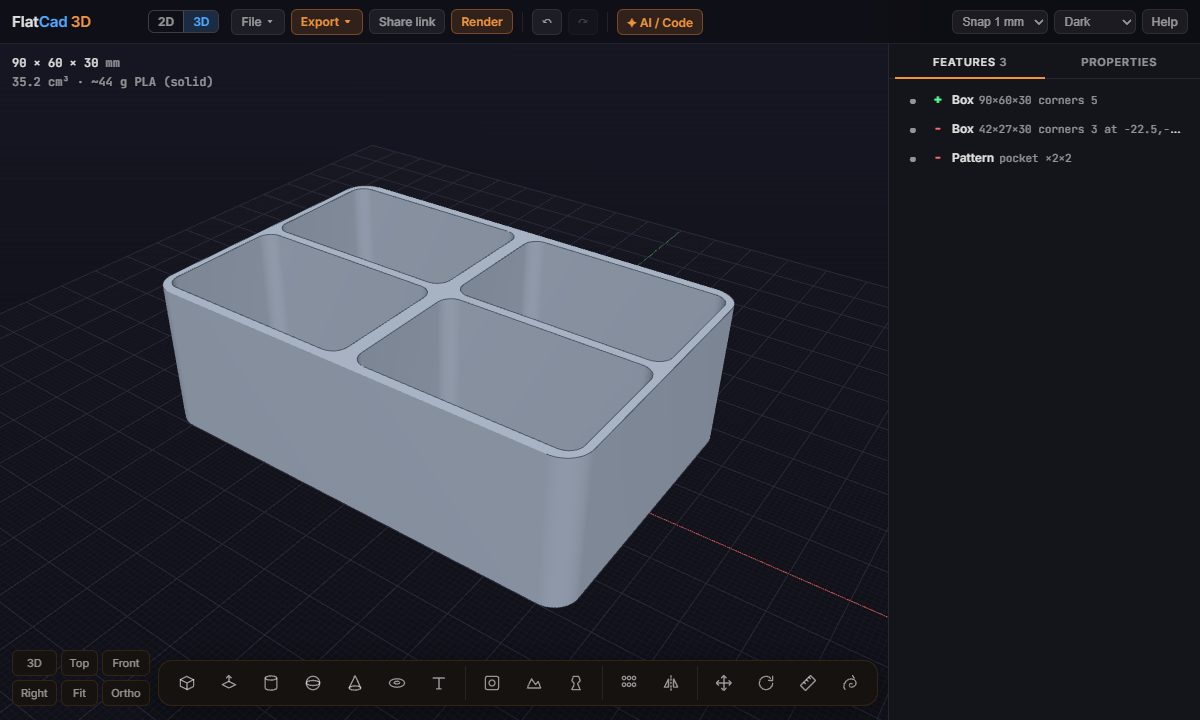
How a part is built
Every part is a list of features, applied top to bottom, in the Features tab on the right. Each feature adds material, cuts it away, or keeps only the overlap. Click a feature, or the shape in the view, and the Properties tab shows its numbers: size, position, rotation, rounded corners. Type a new value and the part rebuilds straight away, so a box that is 2 mm too small is a one-number fix, not a redraw.
Make a parts box in a minute
Draw the box. Press B, click a corner on the bed, type
90,60and Enter, then type the height30and Enter.Round it. In Properties, set Round corners to
5.Cut a compartment. Press B again and draw a rectangle on the top face, then push it down into the box instead of pulling it up: a box pushed into a face cuts. Type
28for a 2 mm floor.Repeat it. With the compartment selected, click Pattern in the bar under it, then set Count 2, Step X 45, Rows 2 and Row step Y 29 (or whatever spacing fits).
Export. Export → STL or 3MF, and open it in your slicer.
Or skip the drawing: File → Examples has this parts box, a mounting plate, a phone stand, a name keychain, a knob and a vase to start from.
Tools
| Tool | What it does |
|---|---|
| Box B | Click two corners and pull up a height, on the bed or on any face. Push into a face to cut. |
| Push/Pull P | Click a face and move it out or in by a typed distance. |
| Cylinder, sphere, cone, ring | Click where it goes; set diameter and height in Properties. |
| Hole H | Click any face to drill straight into it. Screw sizes, counterbore and countersink. |
| Text T | Raised or engraved lettering, placed on any face. |
| Sketch K | Click an outline, rectangle or circle on a face or the bed, then extrude it. |
| Revolve | Spin a profile around an axis: vases, knobs, wheels. |
| Pattern, Mirror | Repeat a feature in a row, grid or circle, or mirror it or the whole part. |
| Move M, Rotate Q | Click a base point and where it goes, or type a distance or angle. Ctrl makes a copy. |
| Measure D | Click two points for the distance. |
| Sculpt | Push a shape around like clay, for organic forms. |
Drawing tools snap to corners, edge midpoints, edges, the origin and the red and green axes, and can take a height from any point you hover, the way SketchUp does.
Printing tips
- Keep the part flat on the bed (z = 0). The stats at the top left show its size, volume and roughly how much PLA it uses.
- Walls of 1.2 mm or more print reliably with a 0.4 mm nozzle.
- Screw clearance holes: M3 = 3.4 mm, M4 = 4.5 mm. The Hole tool's countersink sinks flat-head screws flush.
- Make a cut slightly longer than the wall it goes through, so it opens cleanly on both sides.
Other ways in
- Make an STL file online: a mounting plate with screw holes, step by step.
- Design with ChatGPT or Claude: describe the part, paste the AI's reply, and every feature stays editable.
- Edit an STL: add holes, text or a cut to a model you downloaded.
- Cookie cutter generator and image to STL: a picture to a printable part in one step.
- Name keychain generator and text to STL: a name or a sign in 3D letters, ready to print.
- SVG to STL and DXF to STL: a logo or a 2D part drawing made into a printable 3D part.
- STL viewer: check a model's size and whether it is watertight, and convert between STL, OBJ and 3MF.
- Floor plan to 3D: turn a 2D FlatCad drawing into a 3D house, then render it.
Open FlatCad 3D, free, no signup
Questions
Is FlatCad 3D really free?
Yes. No signup, no paid tier, no watermark and no export limit.
Which files can I export?
STL, 3MF and OBJ, in millimetres, for any slicer (PrusaSlicer, Bambu Studio, Cura, OrcaSlicer). Save the part as a .flatcad3d file to keep every feature editable.
Can I open an STL and change it?
Yes. Import STL, OBJ, 3MF, PLY or glTF/GLB, then drill holes, add text or cut it with a box. See edit an STL online.
Does it work on a Chromebook, phone or tablet?
Yes. It runs in any current browser with WebGL, Chromebooks included. On a phone the feature list becomes a sheet you pull up from the bottom.
Where is my part stored?
In your own browser, saved automatically. Share link puts the whole part into the link itself, and File → Save writes a file to your computer.
Is it a parametric CAD like Fusion 360 or Onshape?
Partly. Every shape is a feature with numbers you can change at any time, and the part rebuilds instantly, but there are no sketch constraints or assemblies. For those, use Onshape, Fusion 360 or FreeCAD.