Edit an STL file online
Downloaded a model that is almost right? FlatCad 3D opens STL and other mesh files in the browser and lets you change them with ordinary CAD tools: drill a screw hole, add a label, cut off a part, or join it to a new shape, then export a new STL or 3MF. Nothing to install and the file never leaves your computer.
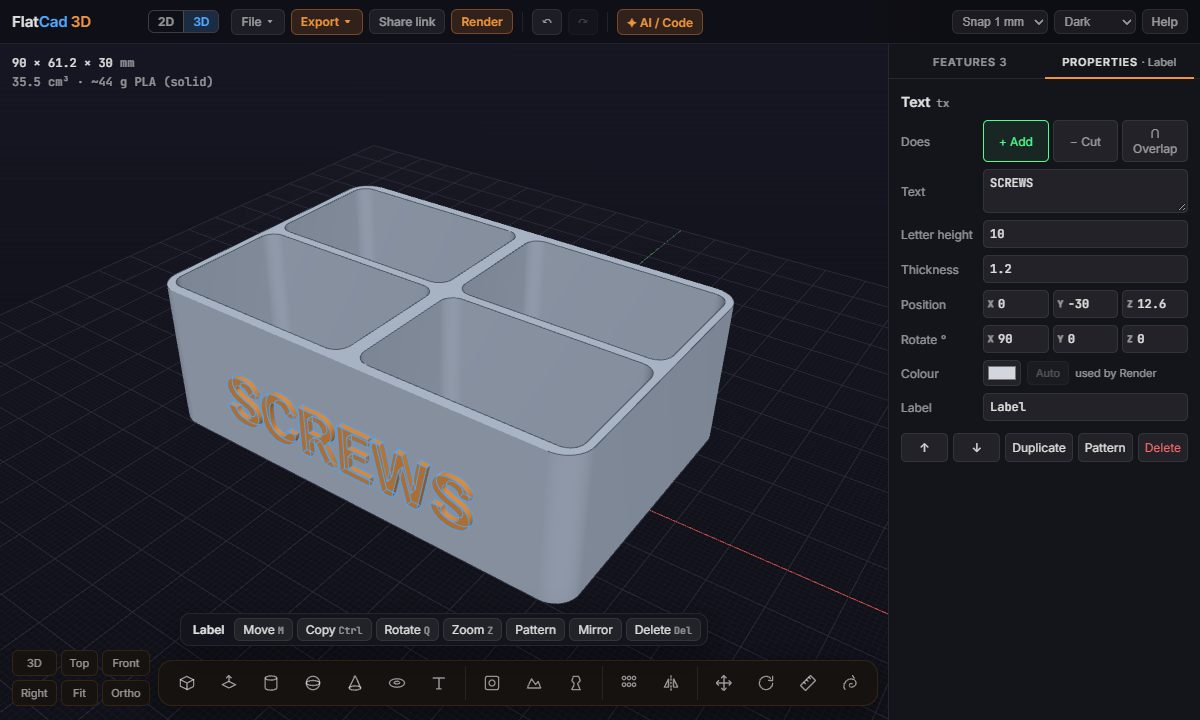
Step by step
Import the file. In FlatCad 3D, use File → Import, or drop the file on the page.
Check its size. The stats at the top left show the size in mm. Wrong? Select the model and change File units or Scale in the Properties tab.
Drill a hole. Press H and click the face; the hole goes straight in. Set its diameter, depth, counterbore or countersink.
Add text. Press T and click the face. Type the text, its letter height and thickness; choose Cut instead of Add to engrave it.
Cut part of it away. Press B and draw a box over the part to remove, then set it to Cut. A box pushed into a face cuts straight away.
Export. Export → STL or 3MF.
Good to know
- The original mesh stays as it was; every change is a separate feature you can edit, hide or delete later.
- Several imported files can be combined into one print, or arranged with Move (M) and Rotate (Q).
- For a scale model (a house at 1:100, say), the Export menu has a scale option that shrinks the file on the way out.
Starting from scratch instead? See make an STL file online. Only need to look at a model, check it is watertight or change its format? The STL viewer.
Open FlatCad 3D, free, no signup
Questions
Which files can I open?
STL, OBJ (with its MTL and textures), 3MF, PLY and glTF/GLB. Pick several files at once to bring an OBJ's material and texture files with it.
My model came in tiny or huge.
Most mesh files don't store units. Select the model and pick its File units (mm, cm, m, inches or feet) in the Properties tab, or type a Scale.
Why can't I cut my model?
Cutting and joining need a closed (watertight) mesh. A model with holes or torn surfaces is shown in red; repair it in your slicer (most have a repair option) and import it again.
Is my file uploaded anywhere?
No. It is read and edited in your browser and never sent to a server.
Can I change the shape of the mesh itself?
You can scale, rotate and move it, cut and join it with other shapes, and push it around with Sculpt. Its triangles can't be edited one by one; for that, a mesh editor like Blender is the right tool.