Make an STL file online, free
You don't need to install anything to make an STL. FlatCad 3D runs in the browser, draws to exact millimetres and exports STL, 3MF or OBJ for any slicer. Here is a 60 × 40 mm mounting plate with rounded corners and four countersunk M3 screw holes, start to finish.
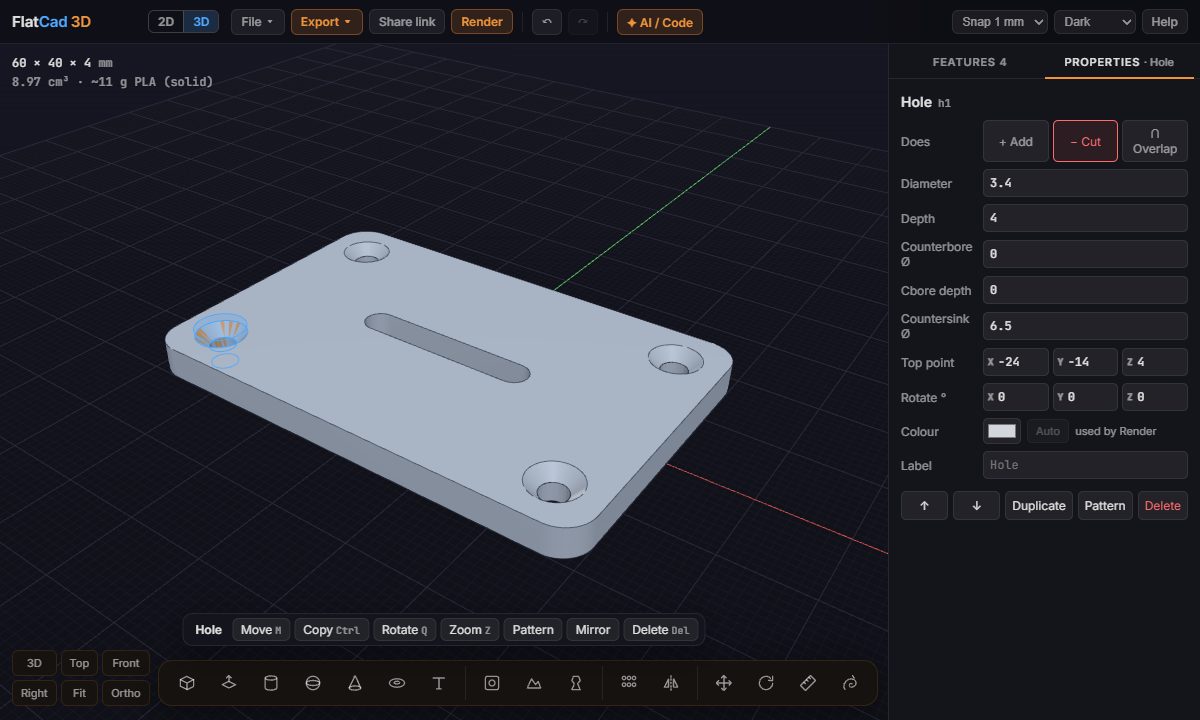
Step by step
Open FlatCad 3D. Units are millimetres and Z is up.
Draw the plate. Press B for Box, click a point on the bed, type
60,40Enter, then type4Enter for the thickness.Round the corners. In the Properties tab, set Round corners to
4.Drill a hole. Press H and click the top face near a corner. Set Diameter
3.4(M3 clearance), Depth4and Countersink Ø6.5. Type its Top point as-24, -14, 4.Four holes from one. With the hole selected, click Pattern in the bar under it, then set Count 2, Step X 48, Rows 2 and Row step Y 28. The pattern copies the hole, so it cuts too.
Check it. The stats at the top left show 60 × 40 × 4 mm and how much filament it uses. Orbit with the left mouse button to look underneath.
Export. Export → STL (or 3MF) and open the file in your slicer.
This plate is also under File → Examples → Mounting plate, if you want to start from it and change the numbers.
Changing it later
Nothing is baked in until you export. Need M4 screws instead? Select the hole and type 4.5: all four change. Plate too short? Select the box and change its width. The part autosaves in your browser, and Share link copies a link that reopens exactly this part on any computer.
Other shapes
Cylinders, cones, spheres and rings place with a click; Text adds raised or engraved letters; Sketch extrudes any outline you click; Revolve spins a profile into a vase or knob. See all the tools, or let ChatGPT or Claude write the part for you.
Open FlatCad 3D, free, no signup
Questions
What is an STL file?
A list of triangles describing the surface of a 3D shape. Slicers like PrusaSlicer, Bambu Studio, Cura and OrcaSlicer read it and turn it into printer moves.
STL or 3MF?
Both work. 3MF is newer and smaller, and keeps the units with the file. STL is the one every program reads. FlatCad 3D exports both in millimetres.
My STL comes out the wrong size in the slicer.
FlatCad 3D works and exports in millimetres. If a slicer shows it 25.4 times too big or small, it is reading the file as inches: pick millimetres when importing.
Can I change the part after exporting?
Yes. The part stays in your browser with every feature editable. Change a number and export again. File → Save keeps a .flatcad3d copy you can reopen anywhere.
Will the STL have holes or errors?
No. Every part is built as one solid, so the exported mesh is closed (watertight). If separate pieces only touch along an edge, the export warns you before you print.