A print-in-place cryptex: how the lock works, and the numbers behind it
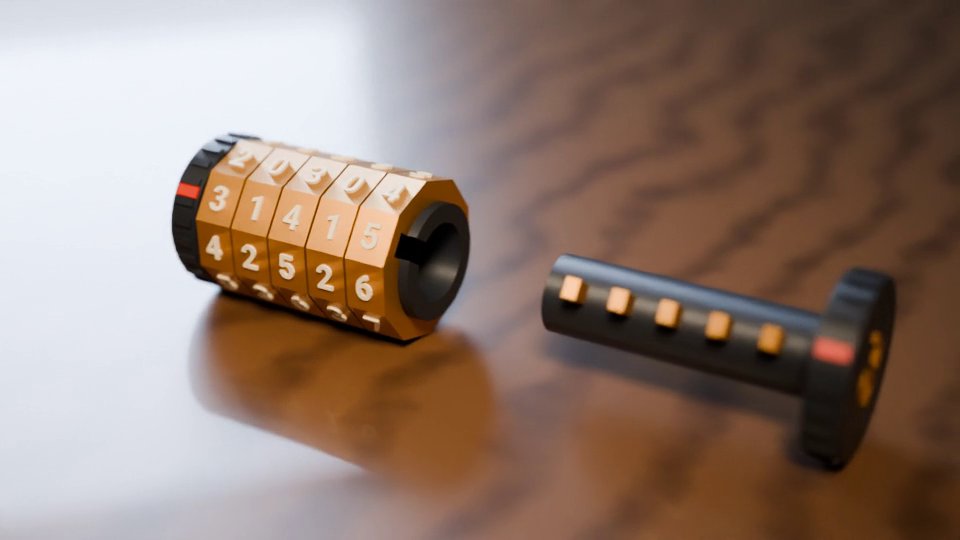
A cryptex is a combination lock shaped like a scroll case: turn five lettered or numbered rings to the right code and the end cap slides out, bringing a hidden tube with it. This one prints in one go, standing up, with all seven pieces already assembled. Below is how the lock works and the clearance behind every moving surface, then how I checked the lock in the geometry engine before sending it to a printer. The last section lists the spots I would watch on a first print.
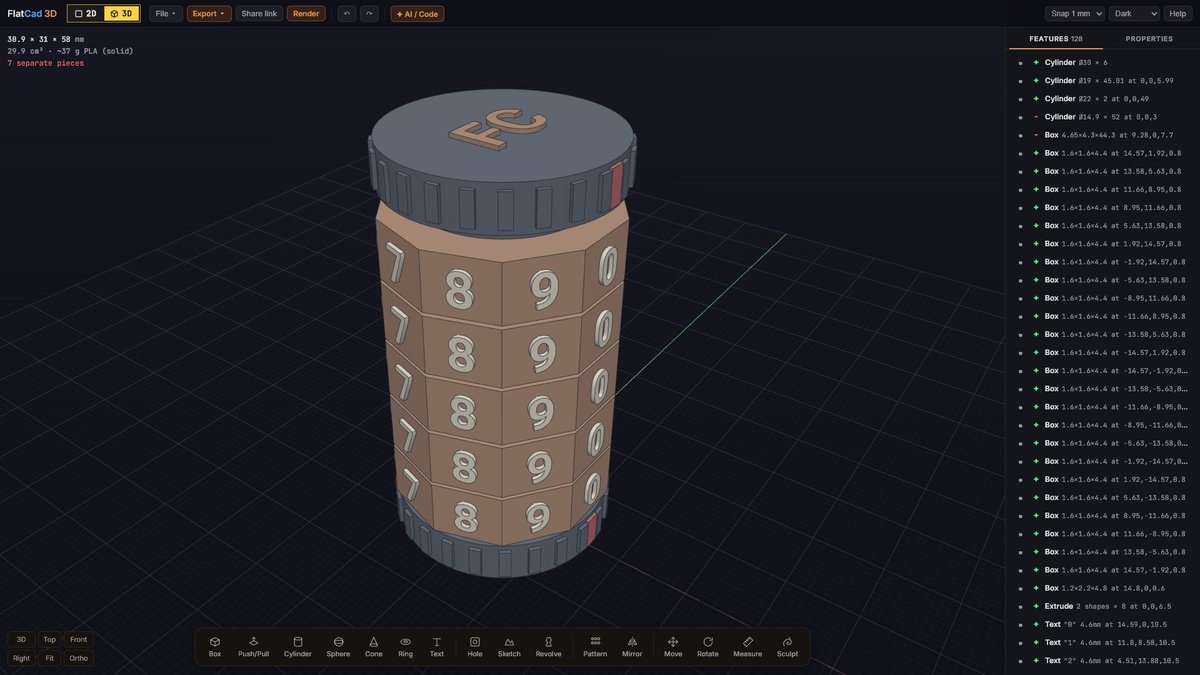
The brief
I wanted something a person could print and use without glue, screws or assembly: five rings with ten digits each, a code of 31415, and a stash big enough for a rolled-up note. That sets two hard requirements. Every pair of surfaces that has to move must be separated by a gap the printer can keep open, and the mechanism must only release at one setting out of 100,000.
I wrote the design as a short script that outputs a FlatCad 3D recipe: a plain list of features (cylinders, boxes, an extruded decagon, a revolved groove, text) with every dimension as a named number. That made it easy to change one clearance and rebuild, and it let me run the same recipe through FlatCad 3D's own geometry engine for testing.
How the lock works
There are three kinds of piece:
- The housing: a base cap, a tube up the middle, and a small lip at the top that keeps the rings on. A lengthwise slot 4.3 mm wide runs up one side of the tube and out through the lip.
- Five rings, threaded on the housing tube. Inside each one is a groove that runs all the way round, plus one notch, 4.4 mm wide, at the angle of that ring's code digit.
- The core: the top cap, a hollow tube that slides inside the housing (this is the stash), and five teeth, one per ring. Each tooth sticks out through the housing slot and into its ring's groove.
While a tooth sits in a groove, it cannot move up or down, so the core cannot come out. The rings can still turn, because the groove goes all the way round. When a ring's notch lines up with the slot, that ring's tooth has a straight vertical channel to slide along. Set all five digits to the reading line and all five notches stack up into one channel along the slot, and the core pulls straight out.
The notches all have to line up with the same slot because the bottom tooth leaves through the notches of every ring above it. It travels the full height of the stack on the way out, which is why the slot runs from just above the base cap all the way through the lip.
The code is set by where each notch is cut. Digit d sits on the face at d × 36° around the decagon, and the notch for the code digit is cut at the same angle. The reading line on the caps is at 0°, above the slot. As modelled, every ring has its 0 face on the line, so the cryptex comes off the printer showing 00000 and locked.
The dimensions
Every gap between moving parts is 0.45 mm sideways and 0.45 to 0.5 mm vertically. The core and stash set the radii, and everything else steps outward from them:
| Feature | Size | Why |
|---|---|---|
| Core tube | Ø14 mm outside, Ø10 mm stash, 44 mm deep | 2 mm wall; fits a note rolled from a 40 mm wide strip |
| Housing bore | Ø14.9 mm | 0.45 mm all round the core |
| Housing tube | Ø19 mm | Just over 2 mm wall, minus the slot |
| Ring bore | Ø19.9 mm | 0.45 mm all round the housing |
| Ring groove | Ø24 mm, 3 mm tall, 45° roof | The roof chamfer prints without supports |
| Ring | Decagon 31 mm across corners (29.5 mm across the flats, about 30.9 mm over the raised digits), 8 mm tall | Ten flat faces, one per digit |
| Gap between rings | 0.5 mm | Rings turn without rubbing their neighbours |
| Slot / tooth / notch | 4.3 / 3.4 / 4.4 mm wide | 0.45 mm each side of the tooth in the slot; the notch is a touch wider still |
| Tooth | 2.5 mm tall, tip at Ø22.8 mm | Stops 0.6 mm short of the groove wall |
| Digits | 4.6 mm tall, raised about 0.55 mm | Bold enough to read on a vertical face |
| Lip | Ø22 mm × 2 mm | Bigger than the ring bore, so the rings stay on |
| Caps | Ø30 mm × 6 mm, 24 grip ridges | Red reading line on both |
Overall the cryptex is 31 × 31 × 57.5 mm and about 30 cm³ of plastic, which FlatCad 3D estimates at around 37 g of PLA if it were printed solid. With normal infill it uses less.
Why 0.45 mm? On a typical 0.4 mm nozzle, gaps of 0.2 to 0.3 mm often fuse in print-in-place parts, especially where a layer is printed over air. Gaps of about 0.4 to 0.5 mm usually come apart cleanly on a printer in reasonable shape. I went for the safe end of that range, because a slightly loose ring costs nothing on a cryptex, but one fused ring ruins the whole print.
Testing the lock before printing
A print-in-place part has no second chance. If two pieces touch in the file, they print as one lump. So before anything went near a printer, I ran a lock test in FlatCad 3D's geometry engine (the same one that runs in the browser). It splits the model into its separate pieces, then pulls the core upward 0.25 mm at a time and checks whether it overlaps the housing or any ring:
| Ring setting | How far the core moves |
|---|---|
| Code set (31415) | Free: past 60 mm, fully out |
| Ring 1 one digit off (and the same for rings 2 to 5, each tested alone) | Jams at 0.75 mm |
| As printed (00000) | Jams at 0.75 mm |
The 0.75 mm is the play before a tooth hits the roof of its groove, and it is the "tug" you feel on a locked cryptex. A single wrong ring is enough to stop it, which is the property that matters.
The second test turns each ring through a full revolution in 6° steps with the core in place, and measures the smallest distance to anything else. At rest, the closest gap between any two pieces is the designed 0.45 mm. During the spin, the tightest moment anywhere is 0.32 mm. That is still fine, but it is a useful reminder: checking only the pose a part is printed in does not tell you how close things get when they move.
These tests prove the geometry. Whether it prints is a separate question. I have not yet printed this cryptex myself, so treat the print advice below as a starting point.
Weak points to watch
Layers printed over air. Standing on its base, every horizontal separation in this design is a gap of 0.45 to 0.5 mm with a part printed on top of it: the first ring 0.5 mm above the base cap, each ring 0.5 mm above the one below, the core tube 0.45 mm above the housing floor, each tooth 0.5 mm above its groove floor, and the top cap 0.45 mm above the lip. The first layer of each of those parts is laid down with nothing under it. It sags a little and may tack lightly onto the surface below. That is normal for print-in-place, and the tack is usually weak enough to break by turning each ring firmly, a few times each way, before you pull the cap. If yours are welded solid, the gap is the first number to increase.
The groove roof. The roof of each ring's groove faces downward, so it would need support if it were flat. Instead it is a 45° chamfer from the groove wall back to the bore, which most printers handle without supports.
It can be felt open. When you pull on a locked core, all five teeth press on their grooves. A ring whose notch is lined up has no tooth pressing on it, so it turns more easily than the others. Patient fingers can find the code one ring at a time. Some lock designs fight this with false notches: shallow decoys that catch the tooth and feel like the real thing. I left them out to keep the first version simple.
The code is fixed. The notch is part of the ring, so you choose the code when you print.
Building it in FlatCad 3D
You can build the same mechanism with the standard tools in FlatCad 3D. Work in millimetres, with the base on the bed and the lock's axis vertical:
Housing. Cylinder Ø30 × 6 for the base, Cylinder Ø19 standing on it up to 51 mm, and Cylinder Ø22 × 2 at 49 mm for the lip. Then a Cylinder Ø14.9 from 3 mm up, set to Cut, for the bore, and a Box 4.65 × 4.3 mm set to Cut, running from 7.7 mm up through the lip on the +X side, for the slot.
One ring. An Extrude of a decagon (corner radius 15.5 mm, flats facing the axes at 0°, 36°, 72° and so on) 8 mm tall at 6.5 mm, with a Ø19.9 circle cut out of it. Revolve the groove profile as a Cut: a section from radius 9.7 to 12 mm, 1.8 to 4.8 mm above the ring's bottom, with the 45° roof back to the bore. Add a Text digit on each face.
The notch. A Box 2.5 × 4.4 × 8.2 mm set to Cut, centred 10.95 mm from the axis at the code digit's angle, rotated to the same angle. For digit 3 that is 108°, at about (−3.38, 10.41).
Five rings. Copy the ring up 8.5 mm at a time (bottoms at 6.5, 15, 23.5, 32 and 40.5 mm) and turn each notch to its digit.
Core. Revolve the tube (Ø14 outside, Ø10 inside, from 3.45 mm up, closed above 47.5 mm), add a Cylinder Ø30 × 6 at 51.45 mm for the cap, and five Boxes 4.9 × 3.4 × 2.5 mm reaching out through the slot, each 2.3 mm above its ring's bottom.
When it is right, the stats in the top-left corner say 7 separate pieces. If the number drops, two pieces are touching. Hide features one at a time to find out which. The AI recipe route also works for a design like this: paste the table above into your AI chat and ask for a FlatCad 3D recipe, then check the piece count.
Print settings to start from
These are typical starting points for a 0.4 mm nozzle, not settings I have tuned on this model:
- Orientation: standing on the base cap, as modelled. No supports.
- Layer height: 0.2 mm, or 0.16 mm for crisper digits. Either way the 0.45 to 0.5 mm vertical gaps are at least two layers.
- Walls and infill: 3 walls, 15 to 20% infill. The core's tube walls are 2 mm, so they print as solid perimeters anyway.
- First layer: do not over-squish it. An "elephant's foot" (a flared bottom edge) on the base cap does not matter, but the base has to stay flat so the first ring sits level.
- Material: PLA is easiest. PETG is tougher but strings more, and strings across a 0.45 mm gap can tie two parts together.
- Colours: FlatCad 3D exports one mesh with seven bodies. Most slicers can split it into parts, so you can give the rings their own filament on a multi-material printer.
Before committing to the full print, it is worth printing a short test: the base cap, the first ring and the bottom 15 mm of the housing and core. If that ring turns and the stub of core lifts when the notch is lined up, the rest will too.
Want the same check on your own designs? Everything here works on any print-in-place part: design the gaps as named numbers, watch the separate-piece count, and test the moving pose as well as the printed one. The gear bearing write-up does the same for a planetary gear set.
Open FlatCad 3D, free, no signup
Questions
Can I change the combination after printing?
No. The code is the angle of one notch inside each ring, so it is fixed when the ring is printed. To use a different code, move the five notches in the model (each one sits at the code digit × 36°) and print it again.
Is it secure?
It is a puzzle box, not a safe. Like most single-core combination locks, pulling gently on the cap and turning each ring until one feels looser gives away the digits one at a time, and the plastic will break long before it resists a determined person.
Can I make the stash bigger?
Scale the whole model in the slicer if you like, but the clearances scale too. A 150% print turns 0.45 mm gaps into 0.68 mm, which works but rattles. It is better to change the core and ring radii in the model and keep the gaps at 0.45 mm.