Choosing between SVG, DXF and PDF for laser cutting and CNC
SVG, DXF and PDF can all carry the outline of a part, and most laser and CNC software opens all three. They are not interchangeable, though. Each one describes curves, sizes, layers and text in its own way, and every conversion between them translates something that doesn't map one to one. Knowing what each format actually holds tells you which one to send, and what to check when a file came from somewhere else.
What is inside each file
| SVG | DXF | ||
|---|---|---|---|
| Curves | Cubic and quadratic Béziers, elliptical arcs, circle and rectangle primitives | True ARC and CIRCLE, polylines with arc segments (bulges), ELLIPSE, SPLINE | Cubic Béziers only; a circle is four of them |
| Units | On width/height, if the writer set them; otherwise pixels | One optional header code, $INSUNITS | Always points (1/72 inch) |
| Layers | Only by convention (Inkscape marks groups as layers) | A real layer table with names, colours, on/off | Optional content groups, if the writer made them |
| Colour | Any RGB stroke and fill | 255 indexed colours (ACI), true colour optional | Any RGB or CMYK |
| Text | Live <text> naming a font that may not be installed | TEXT / MTEXT referencing a text style | Glyphs with the font usually embedded |
| Also | Fills, transforms, embedded images, clipping | Blocks (reused groups), hatches, 3D coordinates | Fills, images, clipping masks, multiple pages |
The practical summary: DXF is the CAD and CAM format, and the only one of the three with real arcs and a proper layer table. SVG is the design and laser format, where colour usually carries meaning. PDF is a page description that happens to be exact about size. Laser software (LightBurn, the Glowforge app, xTool's software) is generally happy with SVG and usually accepts DXF and PDF too. CNC CAM such as Fusion, VCarve or Carbide Create wants DXF or SVG, and gets better toolpaths from real arcs. Cutting services mostly ask for DXF, sometimes AI or SVG. Check their upload page, since many also state a units requirement.
The same circle, three ways
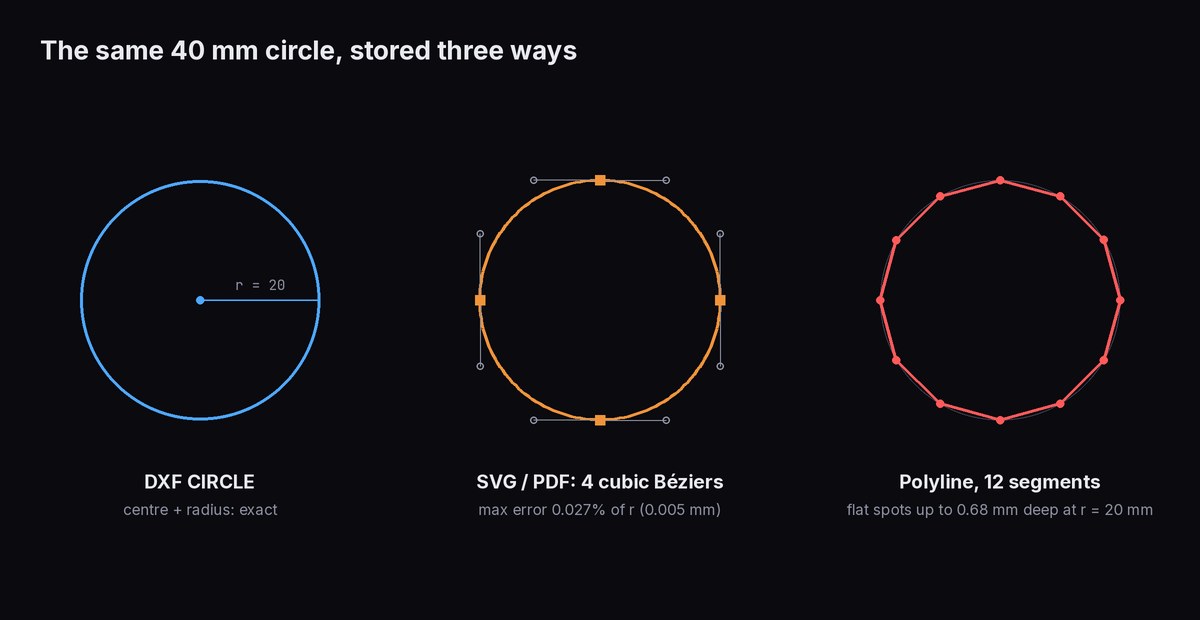
A Bézier curve can't trace a true circle, only approximate one. With the standard four-curve construction the error is 0.027% of the radius, 0.005 mm on a 20 mm radius, far below what any laser resolves. The real cost shows up in CNC. A machine controller moves in straight lines (G1) and arcs (G2/G3). An arc in the file becomes one smooth G2 move, while a Bézier has to become either many short G1 moves or a set of fitted arcs, depending on the software. A faceted polyline is the worst case: the 12-segment circle above deviates by r × (1 − cos 15°) = 0.68 mm at the midpoint of each segment, which you can see and feel on the part.
What breaks in conversion
Béziers to arcs, and back
Going from DXF to SVG is lossless: an arc becomes an SVG arc command. Going from SVG or PDF to DXF is the hard direction, because the converter has to write Béziers as splines, as segments, or as fitted arcs. FlatCad fits true arcs to curves within 0.01 mm and recognises a four-curve circle as one CIRCLE (details on SVG to DXF). Its PDF and AI import go through the same path, and every PDF curve is a Bézier.
Splines and ellipses
Mechanical CAD often exports freeform curves as DXF SPLINE entities. Many laser and CAM programs either read them poorly or flatten them into segments. FlatCad also flattens on import: a SPLINE becomes straight segments, eight per control point and at least sixteen, and an ELLIPSE becomes 64 segments per full turn. If the CAM side needs arcs, ask the source CAD for arcs or polylines on export rather than splines.
Text that was never converted
An SVG <text> element names a font and expects the reading machine to have it. If it doesn't, the laser software substitutes another font or skips the text, and you find out after cutting. DXF TEXT has the same dependency on its text style. Convert text to outlines before sending it: Object to Path in Inkscape, Create Outlines in Illustrator. FlatCad exports its own text labels as DXF TEXT and as SVG text in a monospace font, which is fine for notes but not for cutting. For engraving, select a label and click Text → single-line strokes in the panel, which turns it into single-line strokes (plain ASCII characters only) that a laser traces once. For filled letter shapes to cut out, use text to DXF.
Paths that look closed but aren't
Two endpoints 0.001 mm apart look identical on screen. Software that needs closed shapes (fill engraving, CAM pockets, nesting, "inside first" ordering) treats it as an open line. FlatCad's DXF export joins touching lines and arcs into polylines and sets the closed flag wherever the loop closes, so a closed outline arrives as one closed object. A junction where three or more ends meet stays open by design, because there is no single way round it.
Duplicate and overlapping lines
A shape pasted twice in place, two rectangles sharing an edge, a nested layout where neighbouring parts touch: the laser cuts every copy. A double pass widens the kerf, chars wood and can set acrylic alight. LightBurn has a Delete Duplicates command in its Edit menu. In any CAD program, a quick test is to click a suspicious line and delete it. If a line is still there, it was doubled. Parts that share an edge on purpose (common-line cutting) save time, but the shared cut has kerf on both sides, so compensation has to be planned for it.
Colours that are almost the same
Laser software usually assigns an operation per exact colour. #000000 and #010101 become two layers with possibly different settings. Going into DXF, an RGB colour is snapped to the nearest of 255 indexed colours unless true colour is also written. FlatCad writes both the index and the true colour for each layer, so a reader that understands true colour keeps the exact shade.
The y axis
SVG and PDF count y downward from the top, DXF upward from the origin. A converter that forgets to flip produces a mirror image, which is harmless on a symmetric bracket and ruinous on a part with text or a handed shape.
Clipping masks and hidden layers
Artwork from Illustrator often carries clipping masks: the visible shape is clipped, but the full geometry is still in the file. FlatCad's PDF and AI import leaves out the clipping paths themselves, so artboard and mask rectangles don't become stray cut lines. The artwork under a mask arrives whole, though, so release masks in the source program if that matters. Hidden layers are the opposite trap: FlatCad's SVG export leaves them out, while its DXF keeps them switched off, and not every reader respects that.
Checklist before a file goes to a machine
- Size: one known dimension measures correctly in the software that will cut it. Checking it in the program that made the file proves nothing. If not, see units and scale problems.
- Units declared: an SVG has mm or in on its width and height, and a DXF has
$INSUNITS. Anything sent to a service should say mm or in in the filename or the order notes. - No duplicates: run the duplicate removal, or spot-check shared edges.
- Outlines closed: every part you expect to drop out is a closed shape.
- Text converted to outlines or single-line strokes.
- One colour or layer per operation: cut, engrave, score, and nothing in a colour you didn't mean to use.
- No leftovers: construction lines, hidden layers and uncompensated originals deleted rather than just hidden.
- Kerf applied once, in the file or in the laser software, not both (kerf compensation explained).
- Not mirrored: text reads correctly after import.
- Curves sensible for the machine: arcs for CNC, and no polyline with thousands of segments where one arc would do.
- Inside before outside: holes cut before the outline that frees the part, either by the software's cut order setting or by layer order (SVG to G-code orders inside cuts first).
To check a DXF someone sent you without installing anything, open it in the DXF viewer: layers, size and cut length show up straight away.
Questions
Is PDF a good format for laser cutting?
It can be. A vector PDF holds lines and curves at an exact size, and LightBurn, Glowforge and most design programs read it. It has no real arcs and its layers are optional, so for CNC and CAM a DXF is the better choice, and for colour-based laser workflows an SVG is simpler.
Why does my DXF contain thousands of tiny lines?
Something on the way turned curves into straight segments: an exporter that writes polylines instead of arcs, a spline flattened on import, or an ellipse or text outline approximated by segments. The shape is usually still accurate, but CAM software turns every segment into its own move. Export again with arcs where the source program allows it.
My part came out mirrored. How?
SVG and PDF count y downward from the top of the page, DXF counts it upward. A converter that forgets to flip y produces a mirror image, which you only notice on asymmetric parts and text. Check one with text on it before you cut a batch.