Should you print from STL or 3MF? What each file keeps and loses
STL has been the default 3D printing format since the late 1980s, and it describes one thing only: a cloud of triangles. 3MF was designed to carry what STL leaves out, such as units, separate parts, colours and slicer settings. Both end up as the same toolpaths. What decides which to use is which mistakes you can afford and what your slicer and the people you share files with can open.
What is inside the file
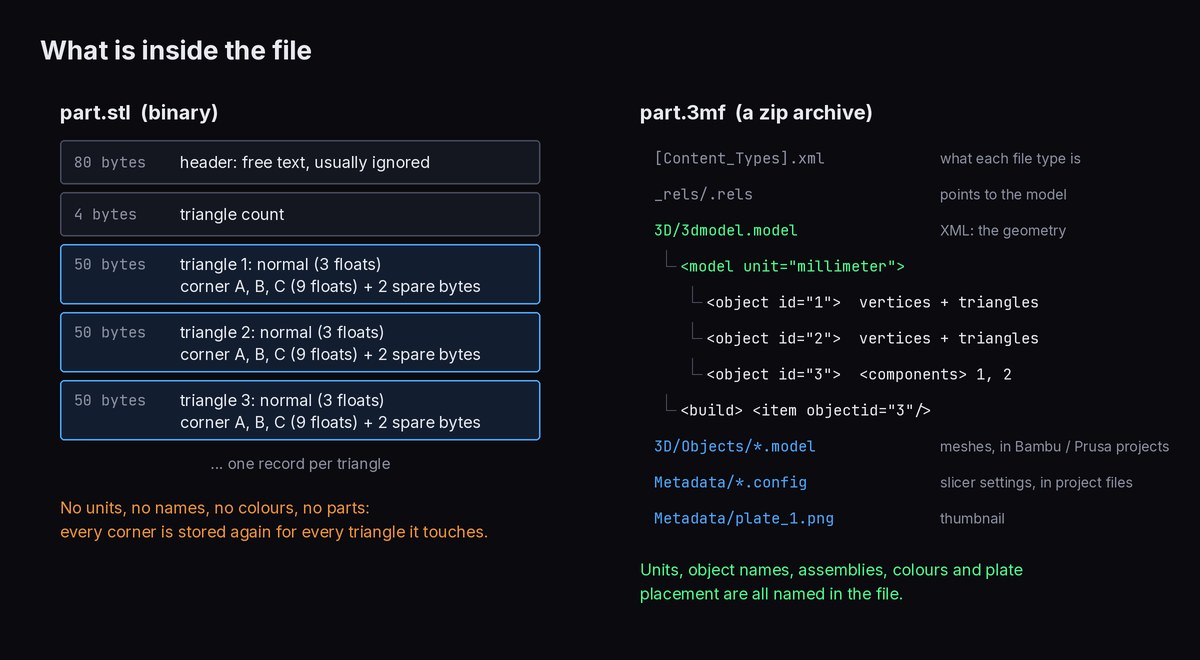
STL
A binary STL is a short header, a triangle count, and then a fixed 50-byte record per triangle (the STL viewer guide walks through the bytes). Because every record is the same size, file size tracks triangle count exactly: a 250,000-triangle scan is about 12.5 MB whatever its shape. The ASCII variant spells the same numbers out as text and is roughly four to five times larger.
What's missing matters more than what's there:
- No units. The corners are bare numbers. A slicer assumes millimetres.
- No connectivity. Nothing says which triangles are neighbours. The reader rebuilds that by matching corner coordinates, and a corner rounded slightly differently in two records turns into a tiny gap.
- No parts, names or colours. Several bodies saved into one STL become one mesh. Some programs abuse the spare bytes for colour, but slicers don't read that.
FlatCad 3D writes binary STL in millimetres, with FlatCad 3D and the part name in the header, and each triangle's normal computed from its corner order.
3MF
A 3MF is a zip archive. Rename one to .zip and you can open it. Inside, [Content_Types].xml and _rels/.rels are bookkeeping that point to the model, usually 3D/3dmodel.model: an XML file whose root element names the unit (micron, millimeter, centimeter, inch, foot or meter). Each <object> lists its vertices once and its triangles as three indices into that list. Objects can be assembled from other objects through <components> with transforms, and the <build> section says which objects go on the plate and where. Colours and materials are defined once and referenced per object or per triangle.
Slicers extend this. A Bambu Studio or PrusaSlicer project 3MF also carries the print, filament and printer settings, per-object modifiers and plate thumbnails in a Metadata/ folder, and Bambu Studio keeps each object's mesh in its own file under 3D/Objects/, referenced from the main model. A project 3MF opened in a different slicer generally gives you the geometry but not the settings.
FlatCad 3D's 3MF has one object in millimetres. The two-colour 3MF download on the text to STL and name keychain pages writes the base and the raised text as two parts of one object, each with a display colour, so the slicer loads them together in place and you assign a filament to each. When FlatCad 3D imports a 3MF, it follows components across files, including Bambu's 3D/Objects/ layout, and converts from whatever unit the file names.
Units: the 25.4 problem
Since an STL has no units, every reader assumes, and nearly all assume millimetres. A knob designed as 2 inches across in inch-based CAD holds the number 2 and prints 2 mm wide, 25.4 times too small. A model exported from a program working in metres (Blender's default scene unit) holds 0.05 for a 50 mm part, and arrives 1000 times too small.
Worked example. The knob arrives at 2.0 × 2.0 × 0.75. The real knob is 50.8 mm across. 50.8 ÷ 2.0 = 25.4, so the file is in inches. Scale by 2540% in a slicer that takes percentages, or set the import unit to inches, which gives 50.8 × 50.8 × 19.05 mm. PrusaSlicer, and the slicers derived from it such as Bambu Studio and OrcaSlicer, usually notice a model that small and offer to convert it from inches. Cura has preferences to scale extremely small or large models automatically. Neither can know for sure, because the file doesn't say.
FlatCad 3D handles a unitless file in this order. First it looks for a units note in the STL header or OBJ comments (units: in, UNITS=MM and similar). If there is none and the model is dropped onto a sketched outline, it picks the unit that fits that outline. Otherwise it guesses from the size: for a printed part, under 1 unit across is taken as metres, anything else as millimetres. The import message says which of the three happened ("the file says", "it fits the outline" or "guessed from its size"), and a guessed unit can be changed under File units in the panel. The inch knob above is 2 units across, so it would be guessed as 2 mm: that's the case to change by hand. A 3MF is simply read in the unit it names.
Inch STLs are rarer than mismatched 2D files, but the diagnosis is the same: divide what you see by what you expected. The 2D version, with all the common ratios, is in DXF and SVG units problems.
Mesh errors slicers complain about
A printable mesh has to be a closed, consistent surface: every edge shared by exactly two triangles, every triangle facing outward. Slicers call anything else non-manifold, and either repair it, slice it oddly, or refuse.
| Error | What it is | What you see |
|---|---|---|
| Holes / open edges | Edges with only one triangle: the surface has a gap | Missing walls or layers, "open edges" warning |
| Flipped normals | Triangles wound the wrong way, so they face inward | Faces shown in another colour, missing infill or skin in that region |
| Edge shared by 3+ triangles | Bodies that touch along an edge, or fins stuck on a surface | Non-manifold warning; parts slice as separate islands |
| Doubled or zero-area triangles | Copies of a face, or triangles with all three corners in a line | Usually silently cleaned; occasionally artefacts |
| Self-intersection | Two shells overlapping inside one mesh | Most slicers merge them; some show internal walls |
Exports from render-oriented software are the usual culprits. A model made for display only has to look right, not be closed, and seams that look joined can be a hair apart. When FlatCad 3D imports a model, it welds corners that lie within a millionth of the model's size of each other, drops zero-area triangles, and checks the result with the Manifold geometry library. If the check fails it tries closing holes, fixing doubled or inside-out faces and mending separate pieces, and the import message lists what it repaired. A model it can't make solid is shown in red and can be viewed but not cut or joined. The STL viewer runs the same check and shows a watertight yes or no before you print.
Bodies that only touch along an edge
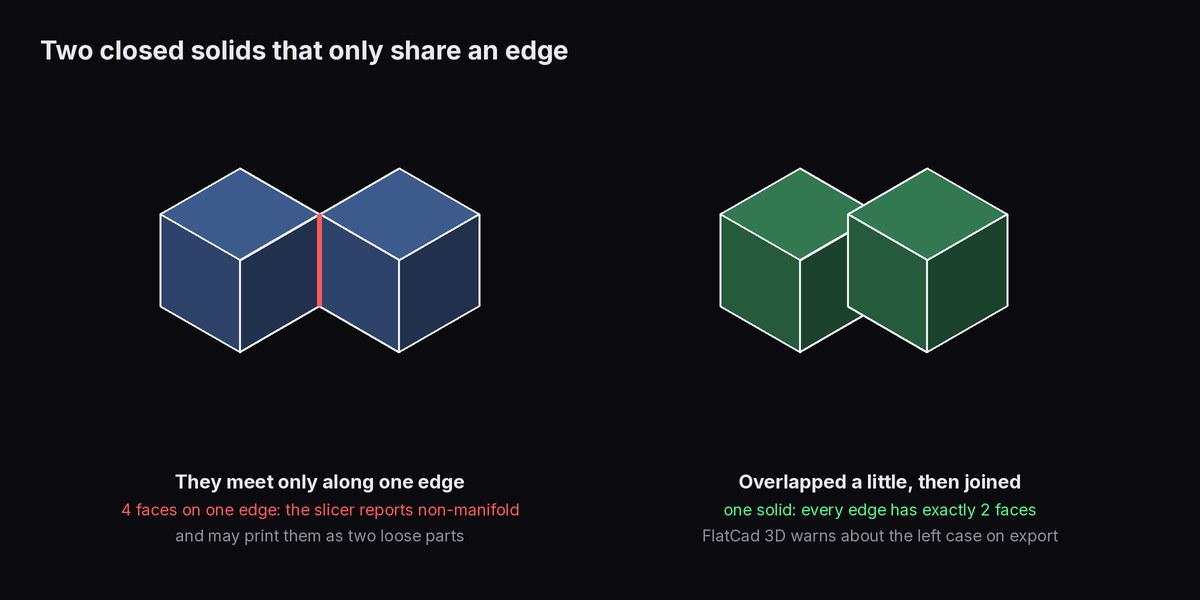
This one catches people because each body is perfect on its own. Put two 20 mm cubes corner to corner so they share only a vertical edge, and once the corners are matched up the shared edge belongs to four triangles instead of two. The slicer flags non-manifold geometry, and what prints is two cubes joined by nothing. The fix is to make them actually overlap, by a fraction of a millimetre or more, so that the union becomes one solid with a real joint.
FlatCad 3D checks for this on export. When the exported part consists of more than one separate piece, it tells you how many. If some of them only touch along an edge, it adds that a slicer will call this non-manifold and that the pieces should overlap a little. Features added as solids are unioned, so overlapping them is enough. Separate pieces that don't touch at all are fine to print. The message is there so it isn't a surprise.
Which one to send
| Situation | Use | Why |
|---|---|---|
| Your own printer, PrusaSlicer, Bambu Studio, OrcaSlicer or Cura | 3MF | Units are fixed, and multi-part and multi-colour models stay together |
| Sharing a model with settings for the same slicer | Project 3MF | Settings, modifiers and plates travel with it |
| Uploading to a model site or print service | STL, plus 3MF if they accept it | STL opens everywhere; say "units: mm" in the description |
| Older tools, CNC or CAM software, some online viewers | STL | Widest support; check the size on arrival |
| Editing in modelling software later | OBJ or the native file | Neither STL nor 3MF keeps the design history |
Whichever you pick, the check is the same: open the file in the slicer you'll print from, read the size it reports, and compare it with one dimension you know.
To check or convert a model in the browser, see 3MF to STL or the STL viewer. To change a model before printing, edit an STL online.
Open FlatCad 3D, free, no signup
Questions
Can I convert an STL to a 3MF and get the units back?
Only if you know them. The STL never recorded its units, so a converter has to be told or has to guess. Once you have set the right unit and the size checks out, saving as 3MF records it for good.
Does a 3MF print better than an STL?
Not by itself: the slicer turns both into the same triangles. The difference is what travels with the mesh: units, separate parts, colours and, in project files, the print settings. That avoids mistakes rather than improving the print.
Why is my 3MF bigger than the STL?
A 3MF stores its mesh as XML text. Zip compression normally shrinks that a lot, but a file stored without compression (FlatCad 3D writes its 3MF that way, for speed) can end up somewhat larger than a binary STL of the same mesh.